> ## Documentation Index
> Fetch the complete documentation index at: https://adro.codes/llms.txt
> Use this file to discover all available pages before exploring further.
# Using the Pub/Sub pattern in a Micro Frontend
> Learn how we can apply the Pub/Sub design pattern to communicate between two micro-frontends
A few years ago the idea of a Micro Frontend solution became quite popular. I honestly haven't stayed up to date with the topic so not sure if it ever went anywhere. I did post [this article](https://dev.to/hurricaneinteractive/microfrontends-what-and-why-4ji2) on dev.to to see what other peoples experience/opinion was on the topic. Looking back at the comments, the 1 user who gave a really detailed comment has either deleted their account or their comment... so thats fun.
Anyway, a question I always had was about data sharing. Essentially, if you have a bunch of different isolated apps, possibly in different frameworks, how would you keep shared state synced across the site. For example, user details or authentication state. Maybe 1 app needs to trigger a modal in another (I had this problem recently).
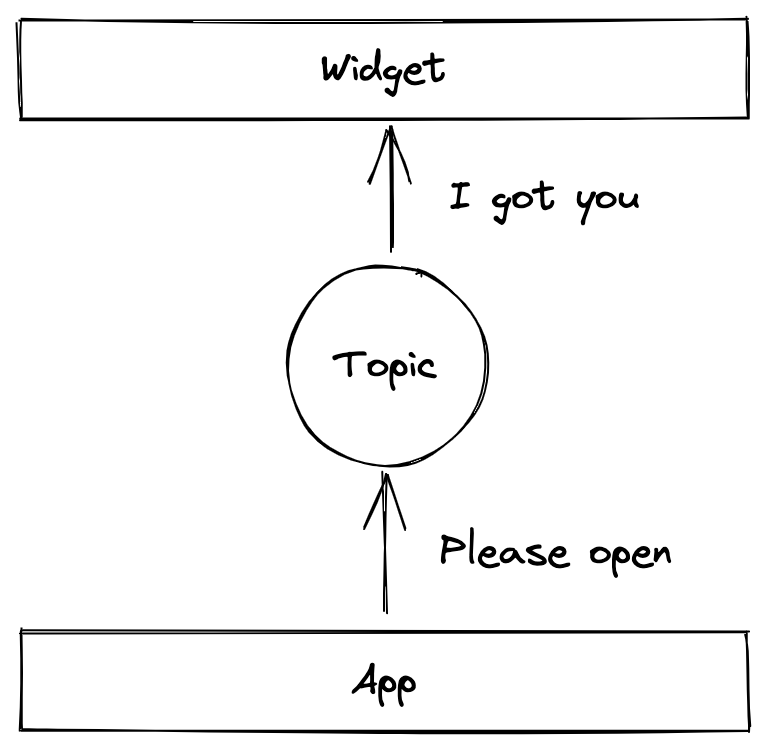
The way I solved it there was using the pub/sub design pattern. The modal was enclosed in a widget with a form to filter some data. It was within the navigation and was used to navigate the user to a area in the website, the navigation was managed by AEM and was disconnected from SPA that made up the rest of the page. In this SPA, there was a "Filter" button, once clicked it published an event, the widget subscribed on that event and once it received a message, would open the modal.
This became a useful pattern in a few spots where really deeply nested components had to communicate to a much higher component. Rather than setting up some context with a bunch of `useEffects` to listen to changes, I just published and subscribed to some events. Luckily this was only needed less than a handful of times so the solution didn't need to be the most robust, ultra fast, 0.002ms response time type solution.
The way I implementated that was by dispatching a `CustomEvent` with my data and adding event listeners on components for this event. It meant that I didn't need to keep a list of subscribers because `addEventListener` did that for me, and I didn't need to loop through my subscribers to push them the changes, again, `addEventListener` does that for me. Have a look at the mandatory "Counter" example [on Codesandbox](https://codesandbox.io/s/react-pub-sub-custom-event-bcwcn?file=/src/AppEvent.tsx).
***
This worked out quite well, the project launched and I haven't thought about it much, until recently.
I wanted to experiment with this design pattern a little to communicate between 2 apps in different frameworks. I decided to use [React](https://reactjs.org/) and [Vue](https://vuejs.org/), because I have experience with both.
> I want to make a disclaimer right now. This is a very basic example, I built it without thinking too much. The chances that there is a Micro Frontend state solution is almost a 100%. If you were going to build something custom, I would probably use something like [RxJS](https://rxjs.dev/guide/overview).
***
The first thing I did was build a function called `createSubscriptions`, this would be used to keep track of subscribers, allow things to subscribe and call a action when the subscribers need to be notified.
```javascript theme={null}
function createSubscriptions() {
const subscribers = new Set();
return {
subscribe: (cb) => {
subscribers.add(cb);
return () => {
subscribers.delete(cb);
};
},
publish: (value) => {
for (const sub of Array.from(subscribers)) {
sub(value);
}
}
};
}
```
1. `subscribe`: This method allows things to subscribe to and changes and accepts a callback function which will be the action that is called on `publish`.
2. `publish`: Any part of the application can send out a publish event. We go through each subscriber and call their action.
To use this, you would create a topic with this method and then subscribe to it.
```javascript theme={null}
const counter = createSubscriptions()
```
Now that we have that I created a Vue and React application that will listen to changes and allow the user to interact with the counter from each.
**React app**
```javascript theme={null}
function App() {
const [count, setCount] = useState(0)
useEffect(() => counter.subscribe(setCount), [])
const increment = () => {
counter.publish(count + 1)
}
return ( /* UI */ )
}
```
We need to set up our application state, this allows React to react to any state changes. Additionally we subscribe to the counter with the `setCount` action, this works out because whenever the `publish` is triggered it will call `setCount` with the value. We also return the result of the `subscribe` method which will unsubscribe the component when it unmounts.
**Vue app**
```javascript theme={null}
createApp({
mounted() {
this.unsub = counter.subscribe(this.setCount)
},
unmounted() {
this.unsub()
},
methods: {
setCount(value) {
this.count = value
},
decrement() {
counter.publish(this.count - 1)
}
}
})
```
I've omitted a few this but the concept is exactly the same as for the React app. I subscribe and pass it a method to update the state. I also have an action to `publish` an updated count.
To see all the code, check out [this codesandbox](https://codesandbox.io/s/vue-react-pub-sub-5i7k5k?file=/index.html). To play around with the result, check out [the preview](https://5i7k5k.csb.app/).
I will say with the codesandbox link, the editor preview is really wacked when using the unpkg version of the libraries. The preview link is a lot nicer.
***
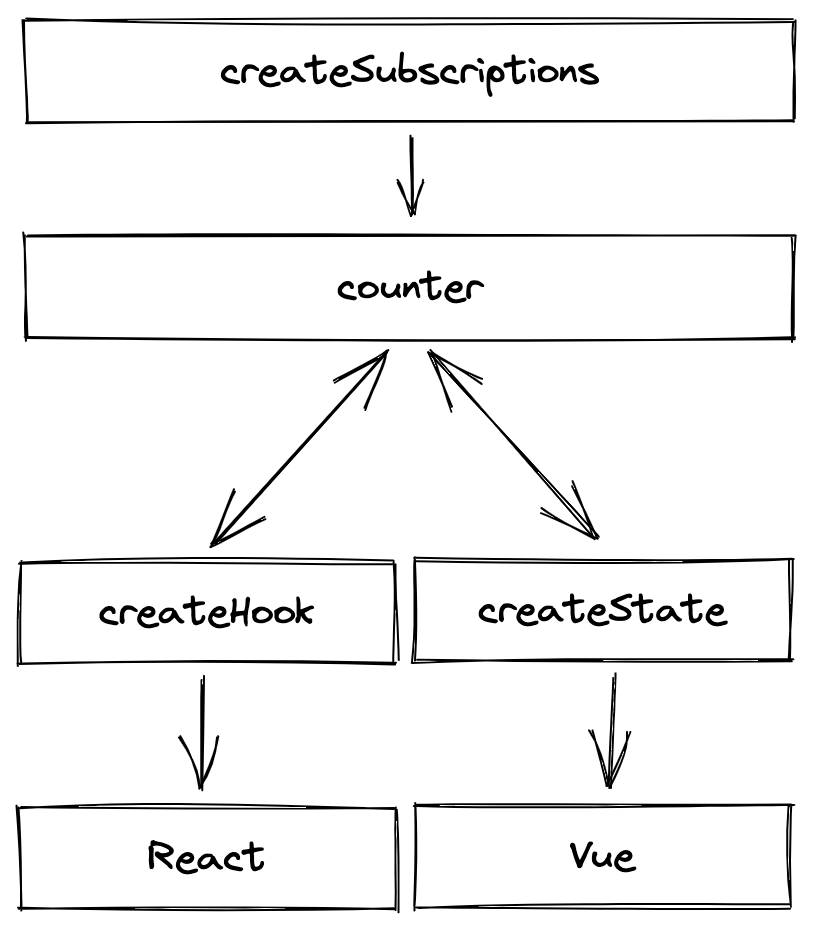
Something I might eventually play around with is using this pattern but allow it to feel more "native" to the platform (again, I am sure this already exists).
The idea being that there are methods to provide React with a hook to interact with the topic and create a store for Vue to interact with the topic. This would allow you to subscribe to a topic anywhere across the app with a standardised approach and keep the data in sync, which sounds pretty awesome.
```javascript theme={null}
const useCounter = createSubscriptionHook(counter)
const counterStore = createSubscriptionStore(counter)
```
***
And that concludes my little adventure of using the Pub/Sub pattern to communicate between two different frontend applications. It was quick, it was dirty but I think it works decently well. Definitely something to keep in mind if I ever have another use case for this in a frontend application.
Peace! ✌️